Artificial intelligence is changing how organisations interact with their business systems. Rather than simply storing information and supporting processes, modern CRM and ERP platforms can increasingly help users understand data, create content, automate routine work and identify the actions they should take next.
Microsoft Dynamics 365 Copilot brings these AI capabilities directly into the applications employees already use.
By providing AI-powered assistance across sales, customer service, marketing and wider business operations, Copilot can reduce the administrative burden placed on employees while helping them work with business data more effectively.
For organisations already using Microsoft Dynamics 365, this creates an opportunity to increase the value of their existing technology investment. For those considering a new CRM or ERP platform, AI capabilities are becoming an increasingly important factor in determining which solution can support future ways of working.
So, what are the main benefits of Dynamics 365 and Copilot together, and how can organisations put them into practice?
What Is Dynamics 365 Copilot?
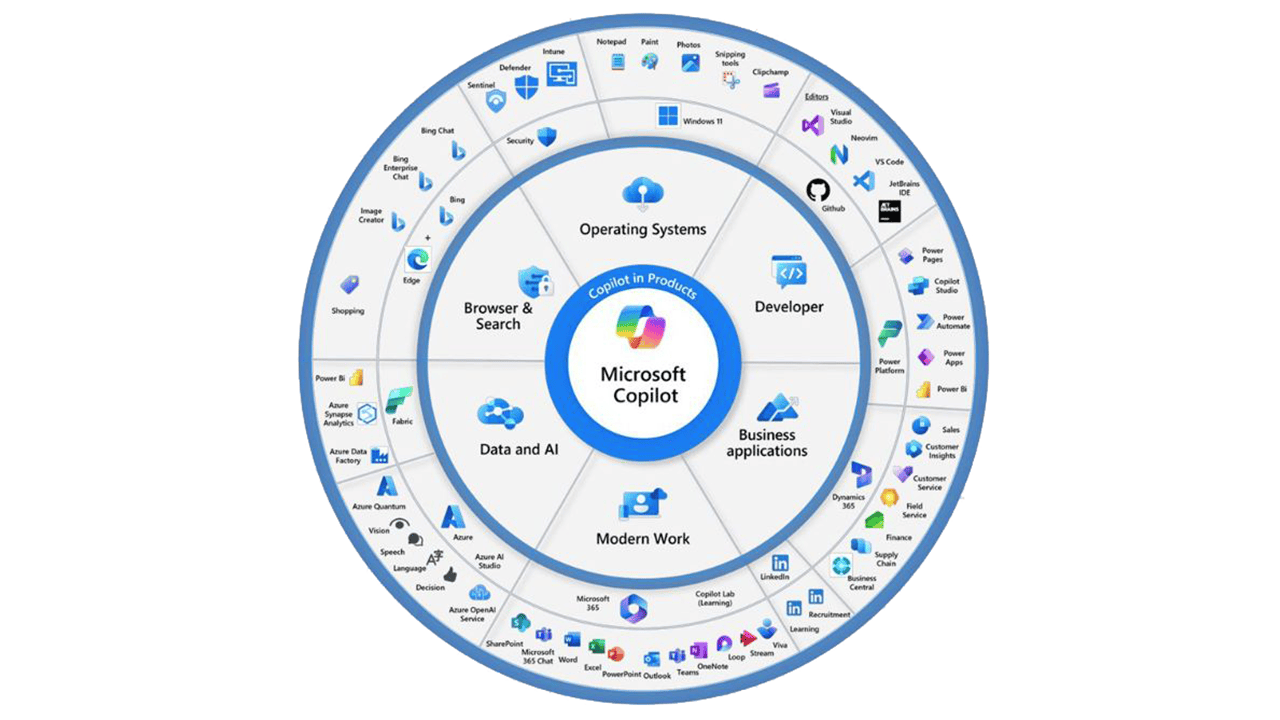
Dynamics 365 Copilot is Microsoft’s AI-powered assistance embedded across its business applications.
Rather than operating as a completely separate AI tool, Copilot works within the context of the applications and information employees already use. Depending on the Dynamics 365 application, it can help users summarise information, draft communications, find relevant knowledge, create customer segments and complete other everyday tasks more efficiently.
This is important because one of the biggest barriers to productivity within business applications is not necessarily the complexity of individual tasks. It is the cumulative amount of time employees spend searching for information, updating records, summarising conversations and completing repetitive administration.
Dynamics 365 Copilot is designed to reduce this workload.
How Does Dynamics 365 Copilot Work?
Copilot uses generative AI to provide interactive assistance within business workflows.
Depending on the application and configuration, it can work with relevant information contained within Dynamics 365 and the wider Microsoft ecosystem to help users understand information and complete tasks more quickly.
For example, a salesperson may need to review a customer record, read an email conversation and recall what happened during the latest meeting before responding to a prospect.
A customer service agent may need to understand a technical question, search internal information for an answer and then formulate an appropriate response.
A marketer may need to define the characteristics of a new audience before translating those requirements into a customer segment.
Copilot can reduce the manual effort involved in these processes by bringing relevant information closer to the user and helping generate the required output.
The result is not simply faster administration. Used effectively, Dynamics 365 Copilot can change how employees interact with CRM and ERP systems altogether.
What Are the Main Benefits of Dynamics 365 Copilot?
1. Reduce Repetitive Administrative Work
One of the most immediate benefits of Dynamics 365 Copilot is the potential to reduce time spent on routine administration.
Employees across sales, customer service, marketing and operations frequently perform tasks that are necessary but add limited direct value. These might include summarising meetings, drafting routine communications, searching for information or creating content from existing data.
Individually, these tasks may only take a few minutes. Across an entire organisation, however, they can represent hundreds of hours of employee time.
By assisting with these activities, Copilot can allow employees to focus more of their working day on tasks requiring judgement, expertise and human interaction.
2. Help Employees Find Information Faster
Organisations typically hold large volumes of useful information across CRM records, communications and other business systems.
The challenge is making that information accessible at the moment it is needed.
Copilot can help users interact with business information more naturally, reducing the need to manually navigate multiple records and sources before taking action.
For customer-facing teams in particular, this can help create a more complete understanding of the customer while reducing the time required to prepare for conversations or resolve queries.
3. Improve Employee Productivity
The productivity opportunity presented by Copilot extends beyond simply completing individual tasks faster.
By reducing the friction involved in everyday processes, organisations can potentially improve the productivity of entire teams.
Salespeople can spend more time developing opportunities. Customer service professionals can focus on resolving complex cases. Marketing teams can dedicate more time to strategy and campaign optimisation.
The value of AI therefore comes from supporting employees rather than simply automating isolated tasks.
4. Support More Consistent Customer Experiences
The quality of a customer interaction can depend heavily on how quickly an employee can access the right information.
When data is difficult to find, responses can be delayed or inconsistent. Employees may also spend valuable time moving between different systems before they have enough context to respond.
Dynamics 365 Copilot can help bring relevant information into the employee's workflow and assist with creating appropriate responses.
This can support faster and more consistent communication while still allowing employees to review and refine AI-generated content before it reaches the customer.
Benefits of Dynamics 365 Copilot for Sales Teams
Sales teams are a natural use case for AI because representatives typically balance customer-facing activities with a significant amount of administration.
Dynamics 365 Copilot can help reduce this workload by assisting with activities such as summarising information, preparing communications and understanding customer interactions.
For example, Copilot can support sales professionals with drafting customer emails and summarising meetings. Relevant information from CRM records can also provide additional context around opportunities and customer relationships.
This gives salespeople a faster route to understanding where an opportunity stands and what may need to happen next.
The business benefit is straightforward: less time spent processing information and more time available for developing relationships, progressing opportunities and selling.
For sales leaders, improved use of CRM information may also contribute to greater visibility over customer activity and pipeline progression.
Benefits of Dynamics 365 Copilot for Customer Service
Customer service teams often need to respond quickly while dealing with a large volume of information.
When a customer asks a question, an agent may need to interpret the request, find relevant information within company systems and formulate an accurate response. Where products or services are complex, this can take considerable time.
Dynamics 365 Copilot can help streamline this process.
AI can assist by surfacing relevant information and drafting contextual responses to customer queries across supported communication channels. The service professional can then review the suggested response, apply their own knowledge and make any necessary changes.
This has the potential to reduce the time spent searching for answers while helping agents respond more efficiently.
For organisations managing high volumes of enquiries, even relatively small reductions in handling time can create significant operational benefits.
Importantly, this does not mean removing the human element from customer service. Instead, Copilot can take on more of the information gathering and initial drafting, leaving employees better positioned to deal with situations requiring empathy, judgement or specialist knowledge.
Benefits of Dynamics 365 Copilot for Marketing
Modern marketing depends heavily on data. However, extracting value from that data can require technical knowledge and time-consuming configuration.
Copilot capabilities within Dynamics 365 Customer Insights can make certain activities more accessible.
For example, marketers can describe the type of audience they want to target using natural language. AI-assisted functionality can then help translate these requirements into customer segments.
This can make segmentation faster and reduce the technical barriers involved in creating more targeted campaigns.
AI can also support the creative process by helping generate ideas and initial content. Rather than starting with a blank page, marketers can use AI-generated suggestions as a foundation before applying their own brand knowledge, expertise and creativity.
The result can be a faster route from campaign concept to execution.
Benefits of Copilot in Microsoft Dynamics 365 Business Central
AI capabilities are not limited to customer-facing CRM applications.
Microsoft is also introducing Copilot functionality across Business Central, helping organisations improve productivity within ERP processes.
One practical example is the creation of product descriptions for organisations selling goods online.
Businesses may already hold information such as product dimensions, materials, colours and other attributes within their systems. Copilot can use this information to help generate product descriptions, which users can then adapt according to requirements such as tone, length and format.
For businesses managing extensive product ranges, this can significantly reduce the manual work associated with preparing product information for digital sales channels.
More broadly, the continued development of AI within Business Central demonstrates the direction of modern ERP technology: moving from systems that primarily record transactions towards platforms that actively assist users with everyday work.
How Can Dynamics 365 Copilot Improve Data Value?
Many organisations already hold large amounts of valuable data within their CRM and ERP platforms.
Yet having data and extracting value from it are two different things.
Employees may not always know where information is stored, which records are relevant or how different pieces of information relate to one another. As data volumes increase, this problem becomes more significant.
AI-powered assistance can make business information more accessible by helping employees find, summarise and act upon relevant data.
This potentially increases the value of the wider Dynamics 365 investment. Instead of business information sitting passively within individual records, it becomes easier for employees to use that information as part of their everyday decision-making.
However, the quality of AI outputs remains closely linked to the quality, structure and governance of the underlying data. Organisations considering greater use of Copilot should therefore also assess their data quality and existing Dynamics 365 configuration.
Can Dynamics 365 Copilot Improve CRM Adoption?
User adoption is one of the most important factors determining whether a CRM implementation delivers its expected return.
Employees are less likely to engage with systems that require excessive administration or make information difficult to find.
Copilot has the potential to reduce some of this friction.
If users can retrieve information more naturally, complete routine tasks faster and receive greater assistance within their everyday workflows, Dynamics 365 can become more useful to them.
Better user experiences can encourage stronger engagement with the platform. In turn, increased adoption can contribute to better data quality, more complete customer records and greater visibility across the organisation.
AI should not be viewed as a substitute for good CRM design or user training. But when implemented within a well-designed Dynamics 365 environment, it can become another important tool for improving how employees interact with business systems.
How to Get the Most From Dynamics 365 Copilot
Simply making AI functionality available does not automatically guarantee productivity improvements.
Organisations need to identify where Copilot can deliver meaningful value within their specific processes.
This starts with understanding where employees currently lose time. Repetitive administration, manual information searches, duplicated data handling and slow customer response processes can all indicate potential opportunities.
The underlying Dynamics 365 environment also needs to be considered. Data quality, permissions, integrations and system configuration can all influence how effectively AI can support users.
A successful approach should therefore consider:
• Which processes create the greatest administrative burden
• Where employees regularly search for or summarise information
• Which Dynamics 365 applications are being used
• The quality and accessibility of underlying business data
• Security and user permissions
• How employees will be trained to use AI effectively
• How the organisation will measure productivity improvements and ROI
This ensures Copilot is introduced in response to genuine business requirements rather than simply because AI functionality is available.
Implementing Dynamics 365 Copilot With Akita
Akita Intelligent Solutions works across Microsoft Dynamics 365 CRM applications and Business Central, enabling us to assess where AI capabilities could deliver the greatest operational value.
Dynamics 365 Copilot can be considered as part of a new CRM or ERP implementation or introduced to enhance an existing Dynamics 365 environment.
Our approach starts by understanding your operations and identifying the processes where Copilot and wider Microsoft AI capabilities can make a measurable difference.
From there, our consultants can support the configuration and integration required to align AI capabilities with your Dynamics 365 environment, while considering important areas such as data access and security.
User adoption is equally important. Akita can also provide training to help employees understand how to use Copilot effectively within their roles and everyday workflows.
The objective is not simply to introduce AI technology. It is to identify practical applications that reduce unnecessary work, improve access to information and help your organisation achieve greater value from its Microsoft business applications.
Unlock the Benefits of Dynamics 365 Copilot
The biggest benefits of Dynamics 365 Copilot come from helping employees spend less time managing systems and more time using the information within them.
Across sales, customer service, marketing and wider business operations, AI-powered assistance can reduce repetitive work, make information easier to access and accelerate everyday processes.
But achieving meaningful value requires more than simply switching on new functionality. Organisations need to understand where AI fits within their existing processes, data environment and wider technology strategy.
Akita Intelligent Solutions helps organisations assess, implement and optimise Microsoft Dynamics 365 and its AI capabilities. Whether you are considering Copilot as part of a new Dynamics 365 deployment or want to understand how AI could enhance your existing solution, our consultants can help identify the right opportunities.
Get in touch with Akita Intelligent Solutions to discuss how Dynamics 365 and Copilot could help your organisation work smarter.